
This page describes how CareCalls sends automated text messages and phone calls, who receives them, and how people consent and opt out. It is published for transparency and regulatory review (including A2P 10DLC).
These are transactional service messages — scheduled reminders, welfare check-ins, and missed-check-in alerts — not marketing or promotional content.
1. The Messaging Programme
CareCalls delivers scheduled reminders and welfare check-ins, and alerts if a reminder or check-in goes unanswered. SMS and phone calls are core deliverables — not ancillary notifications.
The following roles are used consistently on this page:
Creator — the person who sets up the service: they fill in the forms (or give the same details by telephone), review the summary, and tick the terms and contact-consent checkboxes. They are the account holder for that setup.
Receiver — a required contact: the person who will receive the scheduled reminders and check-ins. The Receiver may be the same person as the Creator (self-referral). When they are not, the Creator enters the Receiver's details on behalf of that person.
Supporters — optional additional contacts (family, friends or professionals) the Creator may nominate to receive missed-check-in alerts, reports, or account access. The product UI may label this step "stakeholders"; on this page they are always called Supporters. A service can have zero or more Supporters.
Message recipients for SMS and calls are therefore the Receiver and any Supporters. The Creator always completes consent for the setup; where the Creator is not the owner of a number, the Creator's permission attestation is required but is not treated alone as sufficient for SMS — see How People Opt In and the double opt-in in Path 1.
Message frequency is chosen by the Creator. Many Receivers get a single daily check-in; the maximum is 8 reminders or check-ins per day. Alert messages are sent to Supporters only when a reminder or check-in receives no response within the configured window.
Message and data rates may apply. Recipients can reply STOP to any message to opt out.
Privacy Policy: Privacy Policy. Terms: Terms and Conditions.
2. Links in text messages
Some text messages include a link — for example to sign in, open a help page, or add us to contacts. Where a link would make the message too long, we shorten it through our messaging provider (Twilio Link Shortening) before sending. Shortened links use the domain pandp.click. The shortened link still takes the recipient to the same destination.
When a shortened link is used, our provider records when it is clicked. We use that information only to operate and troubleshoot the service, in the same way as other delivery records. See our Privacy Policy for detail.
3. How People Opt In
This page is the primary public opt-in evidence for regulatory review. There are three entry paths. Web onboarding and telephone setup are the same consent journey for creating a live service (collect Creator, Receiver and optional Supporter details → review → online terms with unchecked contact consent → identifying SMS and START). The demonstration path is a separate first-party one-off.
Signing up for a live service often means the Creator enters someone else's phone number or email — for example when the Receiver is not the Creator, or when optional Supporters are added. CareCalls does not treat the Creator's permission attestation alone as sufficient consent for messaging those people. Our terms require the Creator to confirm they have permission before providing those details, but for SMS we also use a double opt-in: every new mobile is sent an identifying message explaining that they have been added, who added them, and the purpose of CareCalls (scheduled reminders, welfare check-ins, and missed-check-in alerts). They must reply START before any further SMS is delivered to that number; until they do, regular reminder, check-in, and alert texts are not sent. For US mobiles this is enforced by the system.
Consent checkboxes are never pre-ticked or bundled into unrelated terms.
| Path | Section |
|---|---|
| 1 — Web onboarding (Creator; required Receiver; optional Supporters) | Path 1 |
| 2 — Telephone setup (converges on the same online consent) | Path 2 |
| 3 — One-off demonstration (first-party only; not a Creator/Receiver/Supporter setup) | Path 3 |
4. Path 1: Web onboarding
Public multi-step setup on carecalls.promptandprotect.com. Entry (no login required to start): carecalls.promptandprotect.com/onboarding/call-creator-details.
This is one flow with variations, not separate programmes (see Creator, Receiver and Supporters):
- Self-referral — the Creator is also the Receiver. Receiver identity is prefilled from the Creator; delivery numbers and schedule are still configured on later steps.
- Creator for someone else — the Creator enters a different person as the Receiver.
- Optional Supporters — on the Supporters step the Creator may add zero or more additional contacts. That step can be left empty.
SMS consent is not collected on the first page. No regular reminder, check-in, or alert SMS is sent until (a) the Creator ticks the unchecked contact-consent checkbox on the terms step and (b), for US mobiles, the number replies START to the identifying SMS.
Creator details (/onboarding/call-creator-details). The Creator enters their own name, phone, email, country, and relationship to the person receiving reminders (this is how self-referral vs Creator-for-someone-else is chosen). No SMS consent checkbox on this page.
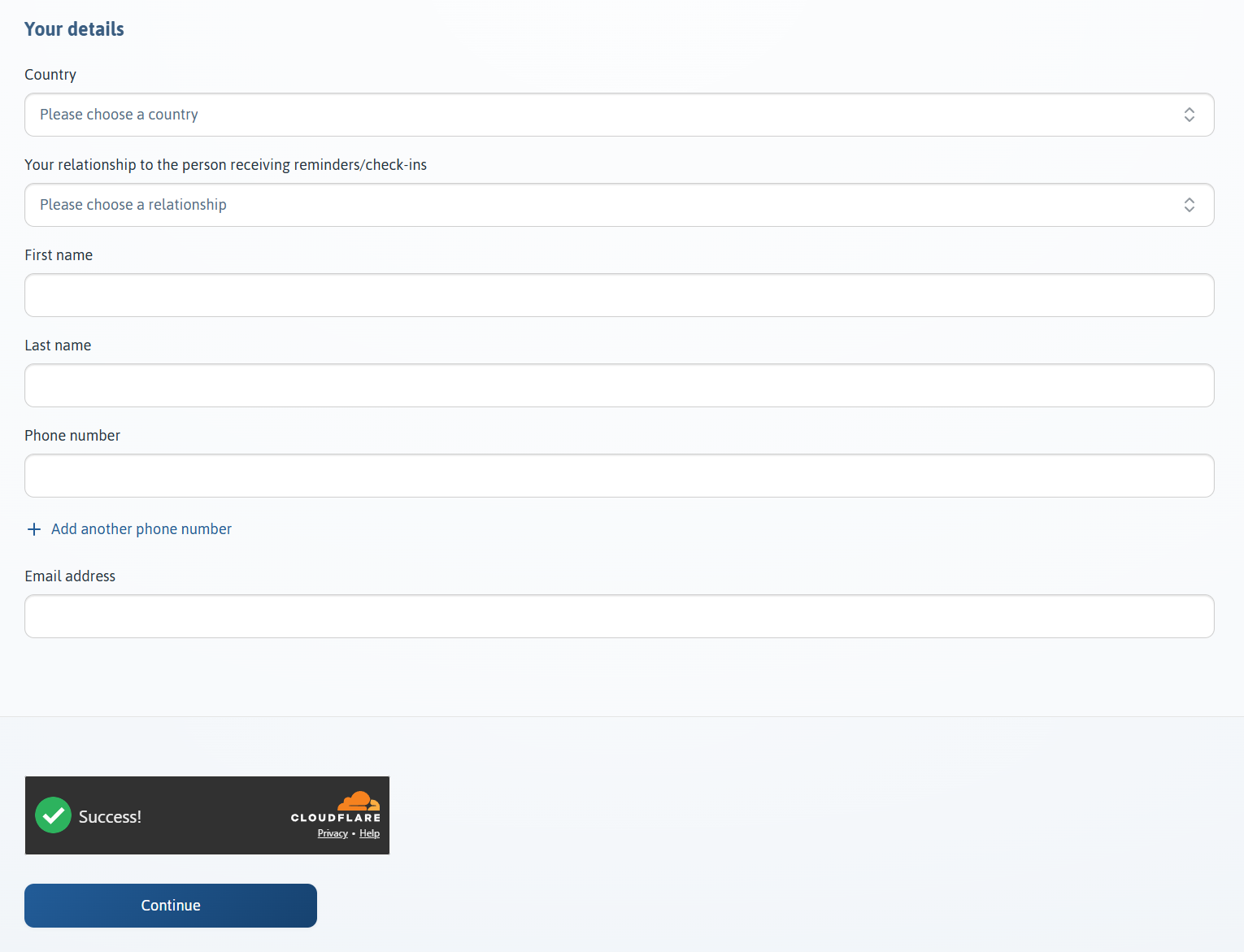
Receiver details (/onboarding/call-receiver-details). Required contact details for the Receiver (name, phones, delivery method, and related settings). Variation: on self-referral, name and email are prefilled/read-only from the Creator; the Creator still confirms delivery numbers. When the Receiver is someone else, the Creator enters that person's contact details here.
Schedule (/onboarding/call-details and related screens). The Creator chooses reminder and check-in times and content for the Receiver. This step does not add new third-party contact numbers.
Supporters (/onboarding/stakeholders) — optional. The Creator may add Supporters who can receive missed-check-in alerts. A permission notice is shown when entering a Supporter's details.
You must have permission from the person in question to add their contact details to our system
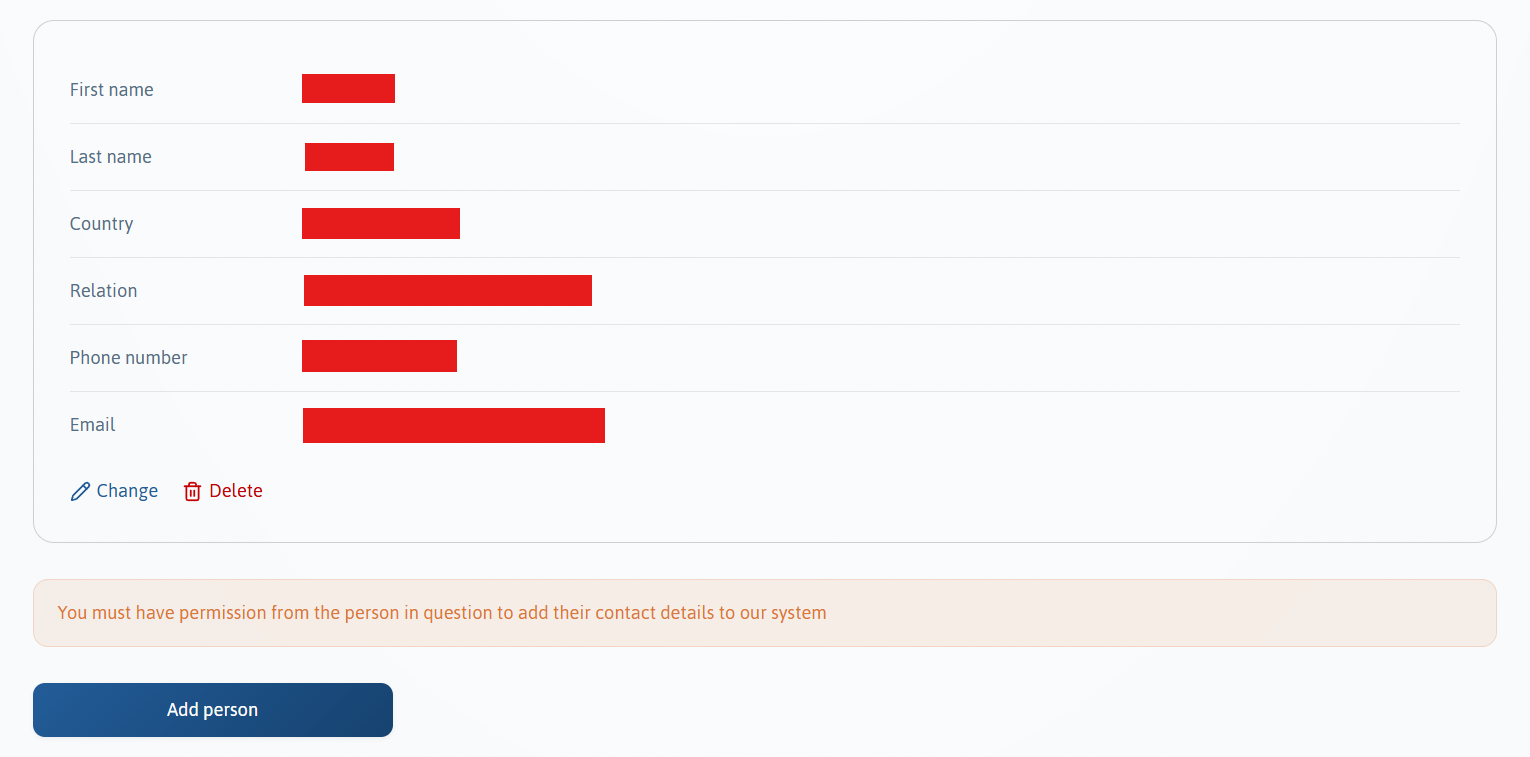
Summary (/onboarding/summary). The Creator reviews the details entered (including the Receiver and any Supporters) before continuing.
Summary email. On submit of the summary step, CareCalls emails the Creator a summary of the setup and a link to continue. No automated service SMS is sent at this point. The Creator must use that email to proceed to online terms. (Telephone setup in Path 2 reaches this same summary-email → terms sequence.)
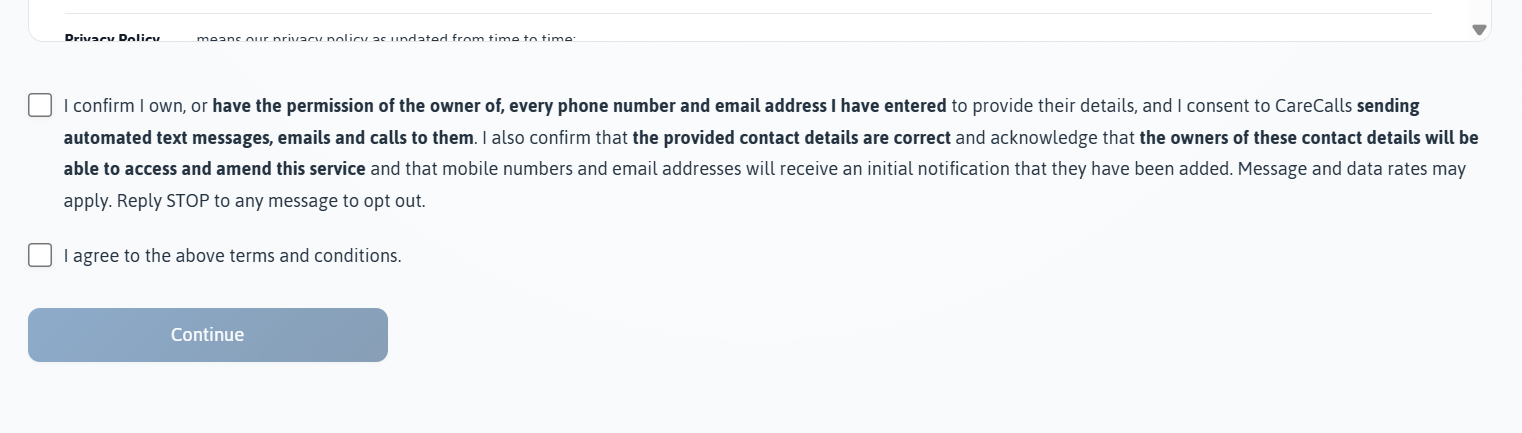
Terms and contact consent (/manage/terms-and-conditions). After following the email link, the Creator must tick two separate, unchecked boxes before the service can proceed: contact consent (SMS / email / calls to every number entered for the Creator, Receiver and any Supporters) and agreement to the terms. No automated message is sent until contact consent is ticked.
I confirm I own, or have the permission of the owner of, every phone number and email address I have entered to provide their details, and I consent to CareCalls sending automated text messages, emails and calls to them. I also confirm that the provided contact details are correct and acknowledge that the owners of these contact details will be able to access and amend this service and that mobile numbers and email addresses will receive an initial notification that they have been added. Message and data rates may apply. Reply STOP to any message to opt out.
Exact terms wording.
I agree to the above terms and conditions.
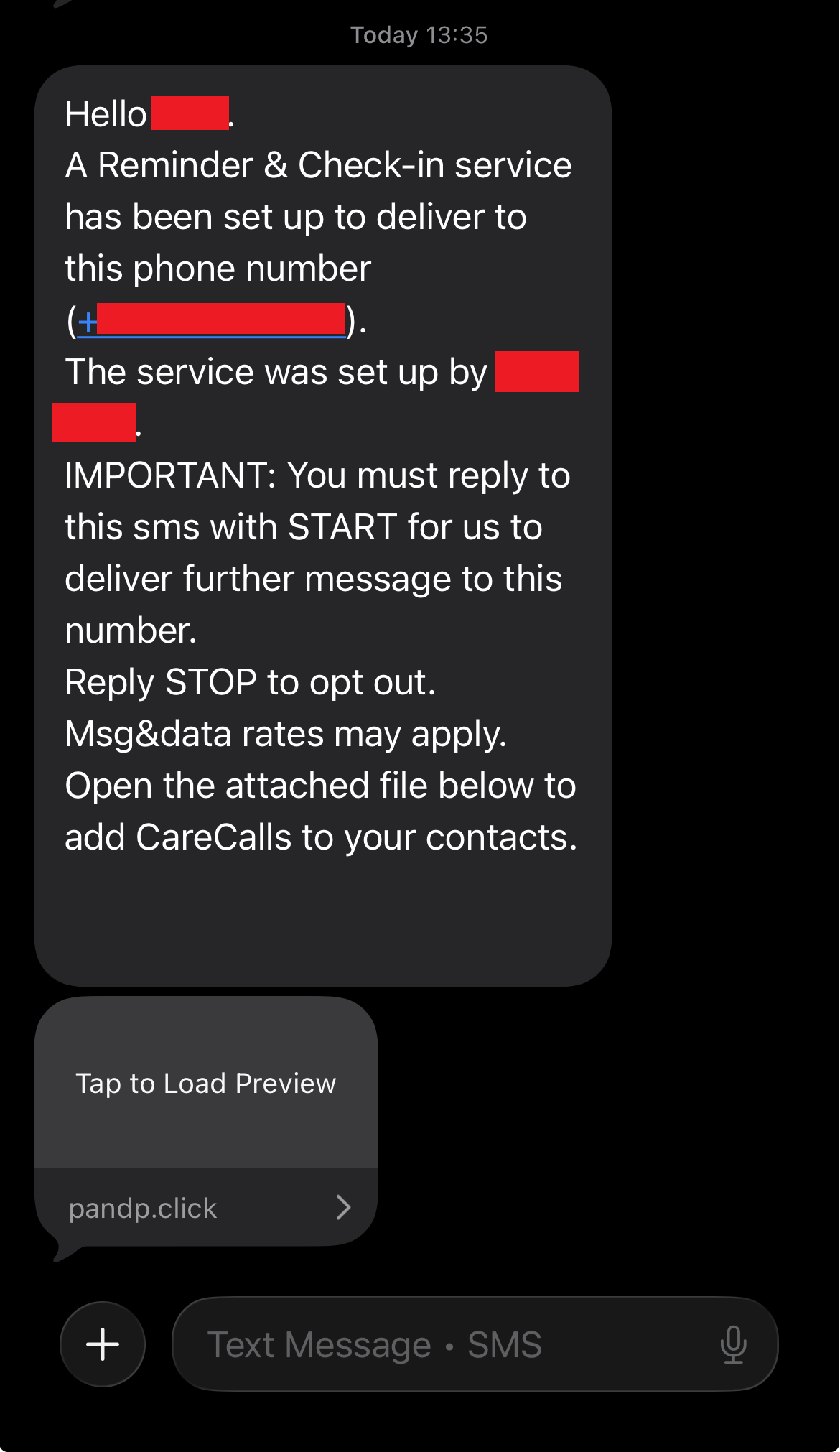
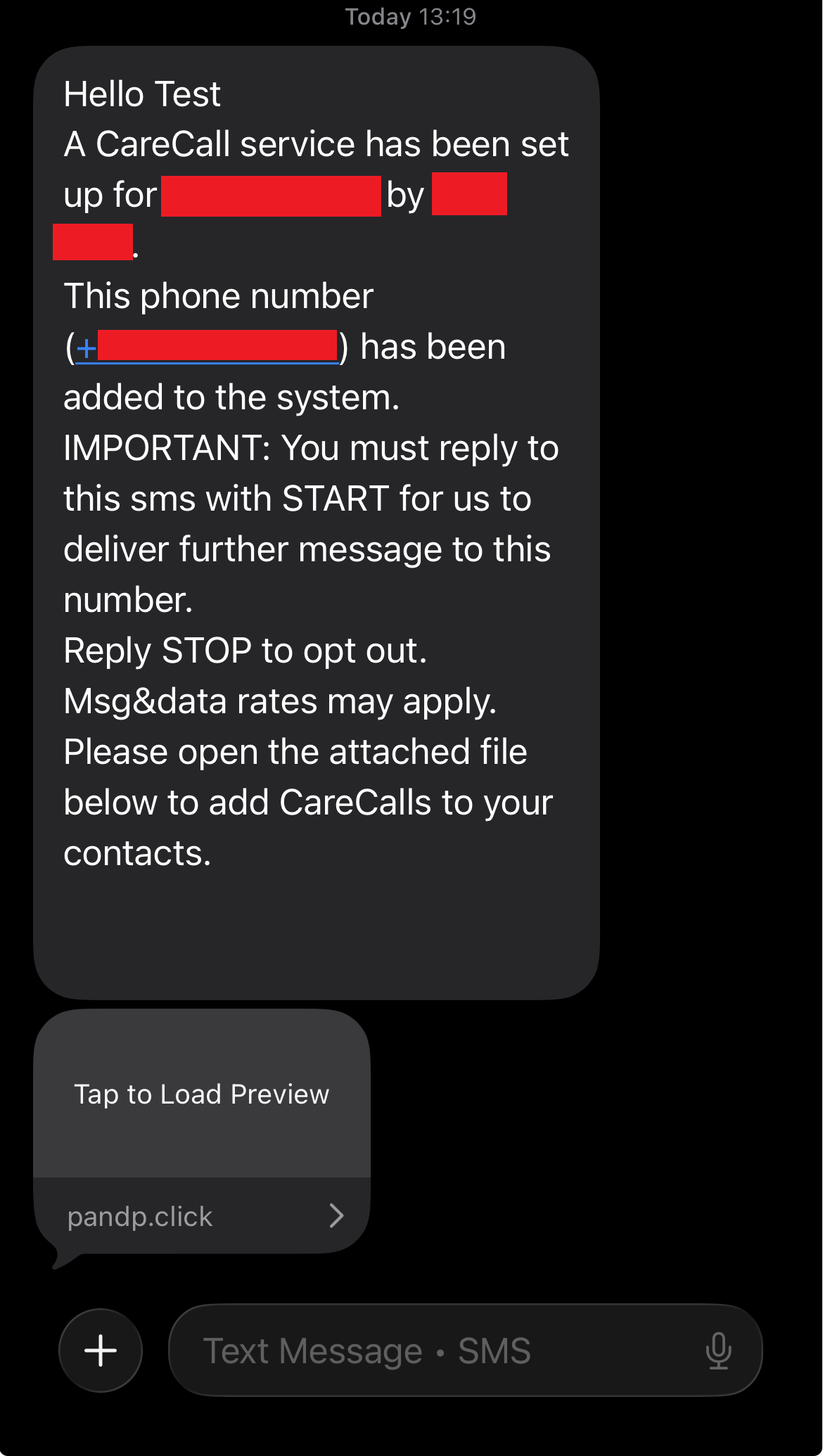
Identifying SMS and START (double opt-in). After online consent, every new mobile number for the Receiver and any Supporters is sent an identifying SMS before regular reminder, check-in, or alert traffic. The message states who added them (the Creator), what they will receive, that message and data rates may apply, how to opt out with STOP, and that they must reply START. For US mobiles this is enforced: further SMS is not delivered until START is received (also accepted: UNSTOP, SUBSCRIBE). Once a number has completed START, that permission is recorded against the number.
Exact identifying SMS — Receiver
Hello John.
A CareCalls service has been set up to deliver to this phone number (+11234567898).
The service was set up by Andrew Palmer.
IMPORTANT: You must reply to this sms with START for us to deliver further message to this number.
Reply STOP to opt out. Msg&data rates may apply.
Open the attached file below to add CareCalls to your contacts.
Exact identifying SMS — Supporter (ask-email variant when no email is on file)
Hello William
A CareCalls service has been set up for John Smith by Andrew Palmer.
This phone number (+19876543212) has been added to the system.
IMPORTANT: You must reply to this sms with START for us to deliver further message to this number.
Reply STOP to opt out. Msg&data rates may apply.
We also recommend you 1. Add your email address here: https://www.carecalls.io/access/[access-token] and
 2. Open the file attached to this sms to add CareCalls to your contacts.
Opt-in confirmation auto-reply (after START / UNSTOP / SUBSCRIBE)
This number can now receive messages from the CareCalls service. Reply STOP at any time to opt out.
5. Path 2: Telephone setup
Where a service is set up by telephone with CareCalls customer service, staff collect the same kinds of details as web onboarding (Creator, required Receiver, schedule, optional Supporters). Consent to receive SMS is not captured verbally as the sole opt-in. Staff verify and record what the Creator provides, including permission and disclosure language on the call, but the path converges on the same gates as Path 1: summary email (so the Creator can review what was entered) → online terms with the unchecked contact-consent checkbox → identifying SMS and START for each new US mobile belonging to the Receiver or any Supporters.
During the call. The Creator provides service details verbally. Staff explain that CareCalls will send automated text messages and phone calls, including scheduled reminders and welfare check-ins to the Receiver, and missed-check-in alerts to any nominated Supporters, at the schedule the Creator chooses. Many Receivers get a single daily check-in; the maximum is 8 reminders or check-ins per day. Message and data rates may apply. Recipients can reply STOP to any message to opt out. No SMS or other automated message is sent during or immediately after the call.
Summary email. CareCalls emails the Creator a summary of the data collected so they can review it (same purpose as the summary email in Path 1, step 6).
Online terms and contact consent. The Creator follows the link, reviews the details, and completes the same /manage/terms-and-conditions step as Path 1 — including the separate, unchecked contact-consent checkbox. No message is delivered until that online consent is completed.
Identifying SMS and START. Every new US mobile for the Receiver and any Supporters then follows the same double opt-in as Path 1, step 9.
Exact contact-consent wording (online; same as Path 1)
I confirm I own, or have the permission of the owner of, every phone number and email address I have entered to provide their details, and I consent to CareCalls sending automated text messages, emails and calls to them. I also confirm that the provided contact details are correct and acknowledge that the owners of these contact details will be able to access and amend this service and that mobile numbers and email addresses will receive an initial notification that they have been added. Message and data rates may apply. Reply STOP to any message to opt out.
Visual evidence — online terms step (same as Path 1)
6. Path 3: One-off demonstration
Anyone may request a one-off demonstration call or text at carecalls.io/demo (US: carecalls.io/us/demo). This path is not a Creator / Receiver / Supporters setup. It is first-party only: the person completing the form must own the number entered. It does not use identifying SMS or START (unlike Paths 1 and 2), so entering someone else's number is not supported here.
The visitor opens the live demo form (public URL above).
They enter their own phone number.
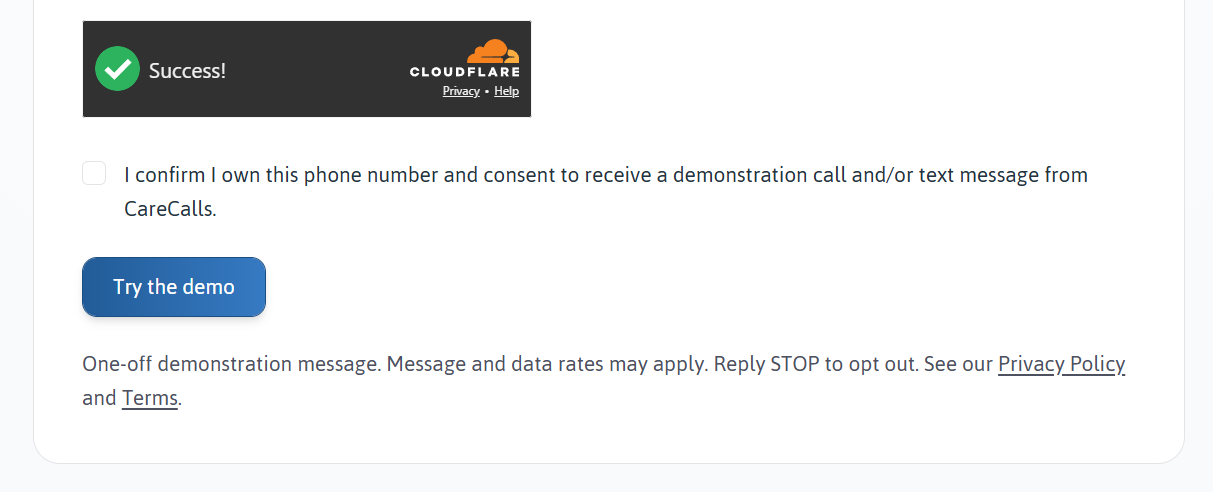
They must tick a separate, unchecked consent box confirming they own that number. The box is not pre-ticked.
Only after that consent is given may a single demonstration call and/or text be sent to that number.
Message and data rates may apply. Reply STOP to opt out.
Exact demonstration consent wording.
I confirm I own this phone number and consent to receive a demonstration call and/or text message from CareCalls.
Disclosure shown with the form: One-off demonstration message. Message and data rates may apply. Reply STOP to opt out. See our Privacy Policy and Terms.
Live URL for review: carecalls.io/demo.
7. Sample Messages
Examples below match live message templates. Reminder and check-in content is customised per service (Receiver name, schedule, and reminder text). Operational reminders and check-ins do not include STOP; opt-out is disclosed at enrolment, on first-contact identifying messages (Path 1, step 9), and in the HELP auto-reply. Identifying SMS include the recipient's phone number in the message body and, where a Supporter has no email on file, a direct access link to add one. Every new US mobile number must reply START before further messages are delivered.
Reminder (to the Receiver).
This is an automated reminder for you to have something to eat. Please reply with 'Y' to confirm you have received this message.
Check-in (to the Receiver).
This is an automated check-in to make sure you are ok. Please reply with 'Y' to confirm you are ok and have received this message.
Alert to a Supporter.
This is a CareCalls alert. John Smith has not responded to a reminder/check-in after 2 attempts. Please reply with 'Y' or 'Yes' with 10 minutes to confirm that you will check they are ok.
Full identifying SMS examples are under Path 1, step 9.
8. STOP, HELP and Opt-Out Routes
SMS keywords. Our inbound SMS handling recognises the following keywords (case-insensitive):
| Purpose | Keywords |
|---|---|
| Opt out | STOP, CANCEL, END, OPTOUT, QUIT, REVOKE, STOPALL, UNSUBSCRIBE |
| Opt in / resume | START, UNSTOP, SUBSCRIBE |
| Help / information | HELP, INFO |
| Confirm receipt (reminders & check-ins) | Y, Yes |
| Skip upcoming deliveries (scope set on Delivery factors) | S, Skip |
| Service activation control (inbound) | Activate, Deactivate, Pause, Unpause |
Automated replies (Messaging Service). Configured in Twilio Messaging Service → Opt-Out Management. Text that does not match a keyword receives the same instructional reply as HELP (handled by our inbound SMS flow).
Opt-in confirmation (after START, UNSTOP, or SUBSCRIBE)
This number can now receive messages from the CareCalls service. Reply STOP at any time to opt out.
Opt-out confirmation
Warning: Any reminders, check-ins or alerts will now not be able to reach this number. Send START to authorise this number for use by the CareCalls service.
Help reply (HELP, INFO, and unrecognised inbound texts)
Welcome to CareCalls
To confirm a reminder, check-in or alert, send: 'Y' or 'Yes'
For a full list of commands or to update your service visit https://carecalls.io/smshelp
Contact us at support@carecalls.io
We do not manually monitor messages sent to this number
Reply STOP to stop receiving messages. Msg&data rates may apply
Full command reference: carecalls.io/smshelp.
Every opt-out route.
You can stop receiving messages from us at any time, by any of the following routes:
- Reply STOP to any text message we send. We will stop sending text messages to that number and will show a notice on the Account so that the person managing the Services knows the number can no longer be used.
- Call us back on the number the Services are delivered from, and follow the options to deactivate.
- Sign in to the Account and remove or change your details.
- Email us at support@carecalls.io, or call 03300588244.
Text messages also support the standard keywords STOP, STOPALL, UNSUBSCRIBE, CANCEL, END and QUIT to stop messages, START to resume them, and HELP or INFO for assistance.
Marketing and service messages are treated differently. Unsubscribing from marketing email stops marketing email only. Messages that form part of the Services — reminders, check-ins, alerts, reports and notices about the Account — will continue for as long as your details remain on an active Account. To stop those, your details must be removed from the Account, or the Services stopped.
Message frequency depends on the schedule chosen for the Receiver. Many people receive a single daily check-in. The maximum is eight per day. Message and data rates may apply.
Additional routes:
- Reply START to resume messages to a number that previously opted out.
- Marketing email only: carecalls.io/email-unsubscribe. Service messages (reminders, check-ins, alerts) require account changes or STOP as above.
9. Legal Documents
Full legal text is hosted on carecalls.promptandprotect.com. Short aliases on carecalls.io redirect there.
10. Our Websites
carecalls.io — Our brand and marketing website — product information, knowledge base, demo requests, and legal document aliases.
carecalls.promptandprotect.com — The sign-up and account management platform where services are created, contact details are added, and consent is captured.
carecalls.co.uk — Redirects to carecalls.io.
Questions? Contact us or email support@carecalls.io.